Monday, 27 August 2018

Providing Default roles to user


Login to Fusion Applications as Implementation User
Navigate to the Setup & Maintenance page and search for task named
Manage HCM Role Provisioning Rules.
currently we are Assigning employee role to all the User created for all the employees under one particular Business unit.
Click on Save and Close.
 
Now auto provision role mapping was created
Run Process: Autoprovision Roles for All Users and Send Pending LDAP Requests.
The Auto-provision Role will be added to all the users.

Sunday, 19 August 2018

Importing categories in fusion application


Importing categories in fusion application
Login to application
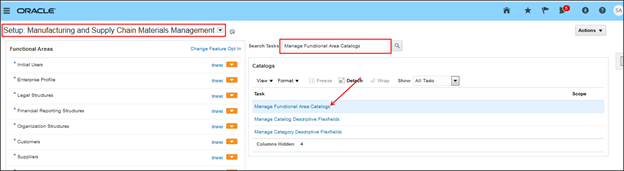
Click on setup and Maintainance.
Search for the task “Manage Functional Area Catalogs”.
Select the functional area and click on edit icon
Cilck on edit in spreadsheet
It will download a file “CategoryImport.xlsm” open the file
Note: we need ADF integrator installed In our system, It was an Add in to the excel to connect with the fusion instance.
When we open Excel  prompt to connection and provide the login details.
It will display all the existing details.
Enter number of rows
Enter the data and click on upload.
Search for the category created in the instance
if a record completes with error status  we can find the error message in the spread sheet. 

Saturday, 4 August 2018

Extended Date functions in in RTF Templates


Get current date
<?format-date:xdoxslt:sysdate_as_xsdformat(); ‘DD/MM/YYYY  HH :MI AM’?>
Get Day from date
<?xdoxslt:get_day(‘2018-07-07’, $_XDOLOCALE)?>
Get Month from date
<?xdoxslt:get_month(‘2000-04-08’, $_XDOLOCALE)?>
Get Year from date
<?xdoxslt:get_year(‘2000-04-08’, $_XDOLOCALE)?>
Get Month Name
<?xdoxslt:month_name(7, 0, $_XDOLOCALE)?>